Hello, Travelers~
The new module "Real-Time Notes" is now available on the Genshin Impact Battle Chronicle tool. Travelers can go to the Battle Chronicle page and view their real-time game data in this module. Here are the steps to view this module~
1. How to Access
After opening the HoYoLAB App, Travelers can quickly access the Battle Chronicle page via Account Info > My Battle Chronicle or Tools > Genshin Impact Battle Chronicle.
After entering the Battle Chronicle page, Travelers can view the "Real-Time Notes" data overview under "My Characters".
(Authorization from Travelers is required when accessed for the first time.)
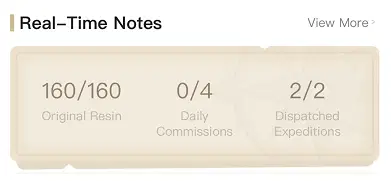
2. View details of "Real-Time Notes"
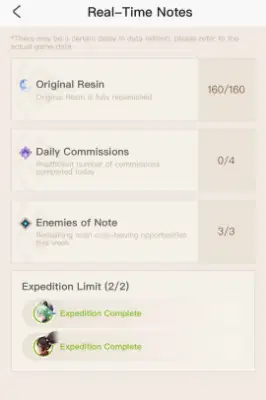
After clicking "View More" in the top-right corner of the note, you can access the details screen of "Real-Time Notes," where Travelers can view:
- Current amount of Original Resin as well as the progress of its restoration in the game
- Current "Daily Commissions" quest progress
- Remaining resin cost-halving opportunities this week for challenging Enemies of Note
- Current "Expedition Dispatch" progress
*There may be a certain delay in data display in this module and is for reference only. Please see in-game for the most accurate information.
3. Data Display Switch
Travelers can click the Settings logo in the top-right corner of the Battle Chronicle page to enter the Privacy Settings page, and choose if they want to display their "Real-Time Notes" data.
After clicking the button to turn off this option, the "Real-Time Notes" module will no longer display relevant data.
The "Real-Time Notes" module is only available on HoYoLAB App, come try it out~