Dear HoYoLAB Users,
To ensure that everyone has a better community experience, HoYoLAB will soon be performing a version update.
After the update is complete, there will be some changes to the pages and functions. To find out more, please see the update details below. We sincerely apologize for any inconvenience caused and thank you for your understanding ><
Update Time
11/25/2021 (UTC+8)
Update Details
1. Addition of Dark Mode to the web version
2. Optimization of the display of the details page for posts with images in the web version
3. Due to the system upgrade, When accessing other people's Battle Chronicle, Travelers cannot view all the characters owned by the other player and their Spiral Abyss team compositions.
The above is this update's content in detail. Mimo will continue to bring the latest news about the community to everyone~

How to Set Dark Mode for HoYoLAB Web Version
Step 1: Open the HoYoLAB website, then click on your profile picture in the top-right corner to enter Settings

Step 2: Select "System Settings", then click "Display Settings"
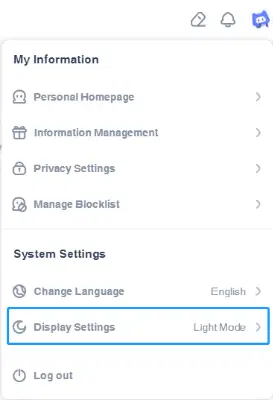
Step 3: Select "Dark Mode" to activate it.