Hello, Travelers~
In recent days, we've been receiving feedback from Travelers who aren't fully sure how to use the Interactive Map's features.
As such, we have created this edition of the Teyvat Interactive Map Usage Guide. We hope that it can help all Travelers better explore Teyvat!
Teyvat Interactive Map Address:>> Click to view Teyvat Interactive Map <<
Q: I just got a new character. How should I use the Teyvat Interactive Map to help search for their Level-Up Materials?
A: You can use the "Character Material" feature to do so.
Click "Add" to select a character and you will see the level-up materials the character needs and the enemies you can get the materials from.
If you are using a computer, simply click on the material or the opponent's name to see their pins.
If you are using a phone, you'll need to first select the materials or opponents you wish to view and then click "View pin" to find their locations!

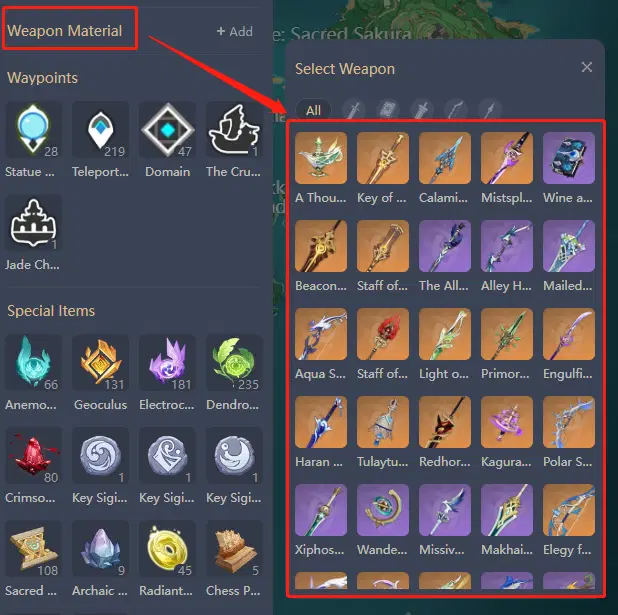
Q: Can I filter for Weapon Ascension Materials via the name of a specific weapon?
A: Absolutely! It works just like how you use the "Character Material" function!
Q: I can't remember when materials get refreshed. Can the Teyvat Interactive Map help me with that?
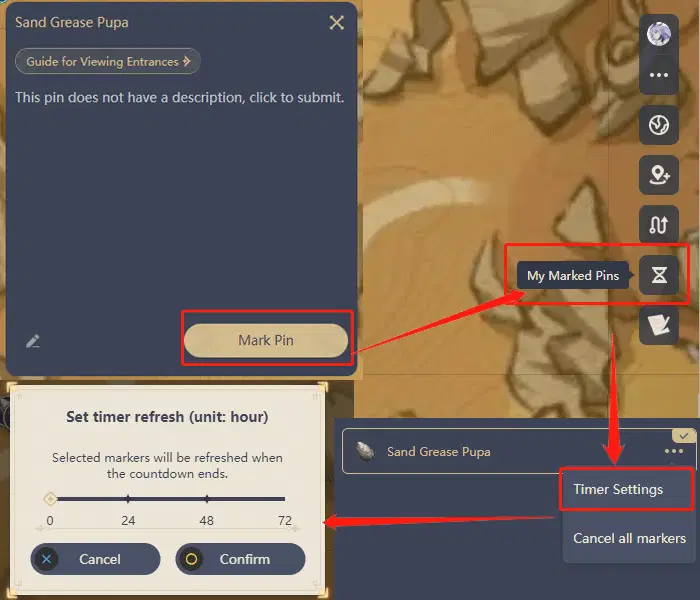
A: The Teyvat Interactive Map has a "Timer" feature to gauge material refreshment times.
To find out when you can gather what materials, first select a material, click "Pin," and then select "Timer Settings" from "My Marked Pins." This will let you know when you can collect this material!
Q: I can only see mainland Teyvat on the map, but I wish to explore The Chasm and Enkanomiya.
A: The Teyvat Interactive Map includes the mainland, The Chasm, and the Enkanomiya regions.
If you are using a computer, you can select the top-left corner of the map to switch regions.
If you are using a phone, you can tap the "Teyvat" icon at the top of the map to switch regions.
After switching regions, if you select the positional pins of treasure chests or Oculi, only the treasure chests and Oculi in the region will be displayed. Example: Should one switch over to Liyue and filter for Exquisite Chests, only the Exquisite Chests located in Liyue will be revealed.

Q: Materials in Sumeru are located both above ground and underground, so they're difficult for me to find. How can the Teyvat Interactive Map help?
A: Using the example of Sumeru's Sand Grease Pupae: Materials above and underground can be differentiated by the markings on their icons. Those located underground are labeled with unique markers.
Click on the material, then the "Guide for Viewing Entrances" button to see how you can access the material!
Hint: Use the Underground Map function at the same time to find the entrance to materials faster!


Q: Almost every single mountain in Sumeru has an underground component. Can the Teyvat Interactive Map help me navigate these areas?
A: Yes. In January 2023, we released the Underground Map function. Feel free to click to access the Underground Map.
In addition to the Underground Map, we have also marked the entrances that lead to underground areas to make your exploration easier.
P.S.: The Underground Map currently only supports Sumeru regions!
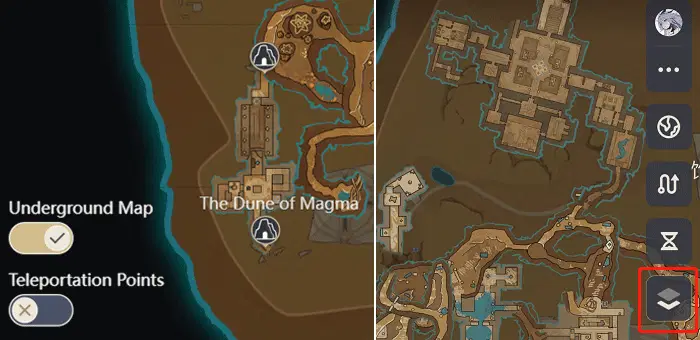
The left image shows the display on PC and the right one on mobile.
Q: How can I view my in-game pins on the Interactive Map?
A: Click the button on the top-right corner to select your server and sync your in-game pins with the Interactive Map.
Hint: Placing pins whenever you find an Elemental Oculus or a treasure chest, then syncing your in-game pins with the Interactive Map will greatly improve your exploration efficiency. We recommend all achievement collectors try using this function!

Should the pin in-game coincide with the one on the Interactive Map, that means you have l
This Teyvat Interactive Map Usage Guide was created based on feedback Mimo collected from Travelers!
If you have other efficient or creative ways of using the Interactive Map, please feel free to share them in the comments section!