I will try to keep this short and sweet. This is just a post to make people (and the devs if they see) aware of the current bugs and their fix, I have seen until now on discord server as I helped others.
You can join their Discord Server here
Before starting Note
If you are facing issues with any in-game things, bugged quests, characters or moves. Please email genshin_cs@mihoyo.com. Do not ask the "how to fix a bug" question in discord.
Bugs and fixes listed
1.] The misunderstood stuck at AR25 Bug
2.] Launcher does nothing when launch is pressed
3.] error code 4201, 4206, 4209, 638,1005, 9908, The application cannot start correctly (0xc000007b), Missing or Corrupt MSVCP140.dll
4.] error message 4302
5.] error message 1008/1004/9102/9107/Failed to check for updates
6.] Game crash after health warning screen
7.] Game stuck at white screen before Genshin Logo pop up
8.] Launcher too big for screen
9.] Game is crashing (Intel iGPU)
10.] Capable GPU and processor game crash
11.] Game crashes immediately on launch
12.] Slow Download
13.] Game not using GPU
14.] Controller not working
15.] BSOD
A misunderstood Bug:
Q. Help! I can't cross Adventure Rank 25! I think my game is bugged!
-> It isn't bugged. You need to take the world ascension quest from the Adventurer Guild and complete it in order to increase your world level which increases your Adventure Rank cap. (Cap = maximum level that can be achieved)
1st problem. The most common one Launcher not doing anything when pressed "Launch"
-> The most common fix to this problem is to locate if you have FACEIT anti cheat installed. For some reason, the FACEIT anti cheat is preventing Genshin to run. Now if you play valve games, there is a strong chance of it being in your computer. (CS:GO, Dota 2, etc.). You have to disable the FACEIT anti cheat to fix the problem. Uninstalling is the last choice you an go for if the game still doesn't boot up
How to disable FACEIT? [It doesn't matter if it's running or not, you need to disable it]
-> Simply launch FACEIT anti cheat and check all your background processes. You should see an orange shield there (just like the one below picture), right click it and disable it.

Q. What do I do? I uninstalled/disabled FACEIT and it's still not working!
-> 1.] Try disabling your antivirus or firewall
2.] Try running the game directly from the folder. (How to do this is given below this text)
Locate to your genshin folder, the place where you installed the game. It should be called "Genshin Impact"
Inside there, locate "Genshin Impact game" folder (It should look this inside this folder)
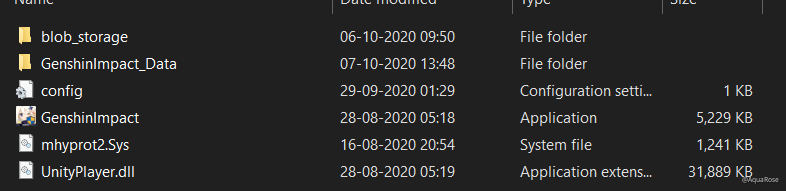
Now here are two possibilities.
A] You double click the GenshinImpact application and nothing happens
B] You don't see the GenshinImpact file, mhypro2.sys file and UnityPlayer.dll (Instead you should have a Temp ZIP file)
In case of scenario B. I uploaded the three files and sent it to someone with this problem, and their game was functional. If you have patience, reinstall the game, if you don't have much time, I will be leaving the file downloads below (via media fire) after downloading them you can place it inside the folder and run the extension of the game directly.
the anti cheat of genshin (Mandatory)
In case of above solutions not working for you, Try disabling firewall and give it a shot. If this too fails, please contact miHoYo's customer support for further details.
Q. I am getting the error code 4201, 4206, 4209, 638,1005, 9908, The application cannot start correctly (0xc000007b), Missing or Corrupt MSVCP140.dll
-> A. Turn on/off VPN, set VPN region to somewhere else. (NA or Asia is good)
B. Use google local DNS. (Click here to know how)
After changing your DNS address, Run command prompt as an administrator.
Type "ipconfig /release" without " (After this wait for 10 seconds)
After the above command, type "ipconfig /renew" without " (Wait another yet 10 seconds)
After the above command type "ipconfig /flushdns" without " (Wait for more 10 seconds and now open the launcher
C. Add a firewall exception for the game:
1. Open the start menu
2. Search for "Allow an app through windows firewall"
3. Click "Change settings" button
4. Click "Allow another app" button
5. Click "Browse"
6. Find and select "C:\Program Files\Genshin Impact\launcher.exe" [For this case, the file is in C drive]
7. Click "Add"
8. Repeat for "C:\Program Files\Genshin Impact\Genshin Impact Game\GenshinImpact.exe"
9. Restart launcher and try again
For the issues with 9908, msvcp140.dll and 0xc000007b, please visit here
Q. I am getting error 4302, how to fix this?
-> A. Delete "C:\Program Files\Genshin Impact\Genshin Impact Game\GenshinImpact.exe" then restore it by pressing Ctrl + Z, or restoring from recycle bin
B. Under "C:\Program Files\Genshin Impact", delete the "Genshin.exe" file and "Genshin_Data" folders Warning, may prompt you to reinstall, attempt at your own peril
* If you have "C:\Program Files\Genshin Impact\Game" or Games instead of "C:\Program Files\Genshin Impact\Genshin Impact Game", rename the folder to "Genshin Impact Game"
* Run the game via GenshinImpact.exe in that folder
C. If you're using x360ce, delete the x360ce files in the game folder, as well as any xinput_(number).dll files in "C:\Program Files\Genshin Impact" (do a search, could be in many places)
* If that doesn't work, may want to try A and B as well.
D. If you installed Reshade.dll:
* Delete gshade/reshade
* Under "C:\Program Files\Genshin Impact\Genshin Impact Game", delete the following:
- Reshade-shaders/gshade (directory)
- Both .ini (files)
- All related “dxgi” (files if found)
E. If all else fails, a reinstall might work.
Q. I am getting the error message 1008/1004/9102/9107/Failed to check for updates, what do I do?
-> 1.] For 1008, Go to your installation directory "Genshin/Genshin Impact Game/" and extract GenshinImpact_1.0.0.zip. Run the game via the .exe not the launcher!
2.] For 1004, A. you have to disable your PC's antivirus and then download it.
The above method may not work!
B. Only other known solution is to redownload the game.
C. You might consider trying to downloading it without the launcher here
3.] for 9102 and 9107, A. Close, the game, delete all of your temp files, then relaunch. Instructions:
[] Press Win + R
[] Type in "%TEMP%" and press enter
[] In the folder that opened, delete everything
Q. Game crashes after showing warning health, what can I do?
-> A. Note: registry editing can be dangerous, follow these steps at your own peril!
[] Download zip file here: https://forums.mihoyo.com/genshin/article/20840
[] Extract the zip file
[] Double click the "genshin crashfix.reg" file
[] Select "Yes" on the dialog
B. You can also attempt a full uninstall + reinstall.
Q. The game starts, it displays a white screen and is stuck on it before genshin Impact logo can appear, How to fix this?
-> Please check if a folder named "DXSETUP" exists within your installation directory. If so, please double-click on the "DXSETUP.exe" executable within the folder to manually install DirectX 11 before restarting the game. If not please download and install DirectX 11.
Q. Launcher is too big for my screen!
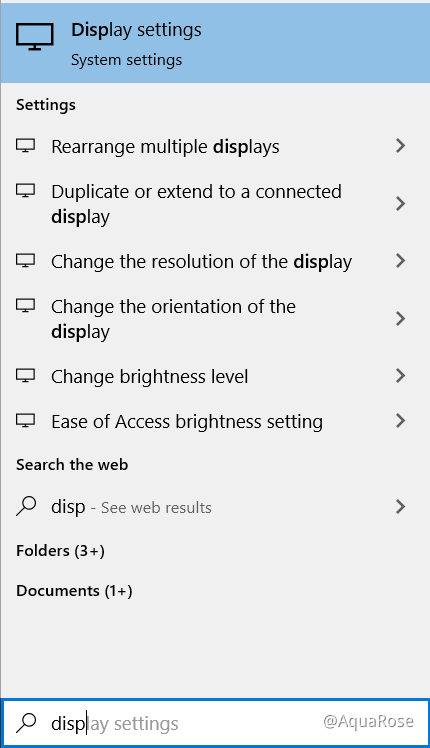
-> 1.] Search for display settings (as shown below)
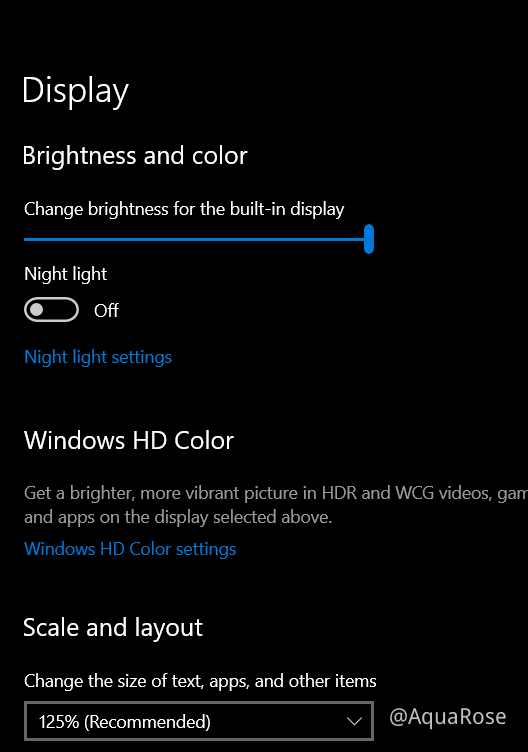
2.] Set the Scale and output to 125% (as shown below)
Q. My game is crashing (for people with intel integrated graphics), how to fix?
-> Genshin Impact is not supported for intel iGPU, as it states that minimum requirement is Nvidia GT 1030 or higher. But, there are others ways you can try which are suggested by both, the customer support and community members.
(Note: try at your own risk)
You can read the solutions here
Q. I have a really capable GPU and a capable processor, but my game crashes.
-> Unfortunately, there is not much know about this problem. (My specs are GTX 1050ti 4GB, i5 9300H)
You should wait for the next patch update.
Q. Game crashes immediately on launch, how to fix?
-> A. In the game launcher, hold shift, then click launch and wait for the "Genshin Impact Configuration" pop up to show up. You can let go after the pop up shows up. Set the screen resolution to the lowest value, check "Windowed", and set graphics quality to "Fastest", then adjust values once you're in-game.
B. Another way to get the "Genshin Impact Configuration" pop up to show up, right click on the Genshin Impact shortcut > Properties > Shortcut and add this text to the Target: -show-screen-selector, it should look like this:
C. Right click the game shortcut, select "Run as administrator"
Q. The launcher is downloading the game really really slow, how do I boost speed?
-> Best solution is to pause and resume downloading until you find an optimal speed to download. (Note: This is like tossing a coin, your speed may get slower or get faster)
Another solution is to directly download the game here
Q. The game is not using my GPU, what do I do?
-> [] If you have an intel iGPU with your dedicated GPU, I would recommend to disable the drivers of the intel GPU, restart PC and try again
[] Make sure you have a good enough PSU
[] If your GPU is old, clean it and then try again.
[] In case of overheating of GPU, you may try undervolting your PC
Q. Game is not detecting my controller, how to fix?
-> Check that your cables are connected properly and that you are using a controller that is allowed, (Eg: PS4, Xbox)
Q. Blue Screen of Death after launching the gamer.
-> So, when you launch the game, it instantly gives you a BSOD, getting to the root of the cause, this was done by mhyprot2, which is the anticheat of the game, No possible fixes are known for now, wouldn't recommend deleting this as there is a fair chance of you getting banned from the game.