Hello everyone, this is Creator's Assistant.
I believe when you browse the forum, you have come across the excellent works of many creators.
I also want to create extraordinary works like them to make our community more diverse and vibrant. I'm sure those of you with a passion for creativity would also like to know how these incredible works were created!
So, the Creator's Classroom is officially here!
We will invite well-known creators from the platform to come and share their creative experience and insights. We hope this will be useful to you!
This time, we have invited "SoraHoshina" to share her creative experience with you. Let's take a look!

▼1. Header▼
● When making a guide, try dividing them into different sections with subheadings. It is used to capture your readers’ attention and tell them which part will they be reading next.
● Furthermore, it breaks up your guide into readable and sequential sections. However, don’t make a long subheading. The shorter the subhead the better.
● For example: Overview, Gameplay, Rewards.

● In HoYoLAB, you can use the H1/H2/H3/H4 for your heading and subheading. If you’re feeling productive, you can try making your own header image to make your guide more colorful.
● There’s also ‘Divider’ that you can select from the tools. However, note that it won’t be visible in the current version of the HoYoLAB Mobile App.
▼2. Text▼
● Guides are full of text, with the exception of infographics. In Genshin Impact, Travelers usually search for guides on how to complete quests/tasks/achievements, searching for recipes/books/hidden items, and how to build a character.
● In every and each of them, avoid the usage of long paragraphs as it will make the reader lose interest. Short and concise paragraphs are great, and adding bullet points is even better. They are here for a sweet and simple guide to complete certain tasks, not to read an essay.
Bad example:
You can find the first Bedrock Key in the Fuao Vale near The Lost Valley Domain. First, teleport to the waypoint east of The Surface and enter the tunnel on the left side of the waypoint. When reaching the Bedrock Key, there will be three Cage-Shaped Geo Formations, and you need to hit each of them according to the position of the Bedrock Key. Hit the Geo Formations just like in the image I provided to complete the task.
For the first Geo Formations, after you hit the Geogranum, a group of slimes will spawn, and you need to defeat them first so they won’t disturb your task. The next Geo Formation is on the left side of your current position, and there won’t be any enemies here. The last Geo Formation is at the bottom platform, where you can see a Hilichurl near it.
Good example:
The first Bedrock Key is in the tunnel area of Fuao Vale. Teleport to the waypoint east of The Surface and follow the tunnel until you reach the Bedrock Key.
1. First Geo Formation: Just beside a bridge.
2. Second Geo Formation: Turn to your left and go across the bridge.
3. Third Geo Formation: Go to the ground below at the far corner.
● Once creating your text, re-read it and try to find any complex words, and change it to a simpler one. We don’t know how old our readers are and if whether they are experts in English or not. Just to be safe, simplify your language so everyone can read it.
▼3. Colors & Bold▼
● Next is coloring and bold important phrases/keywords! While it may sound childish with your guides full of colors, people might get bored while reading if your text is only in black & white. A splash of colors is what readers need to stay focus.
● Now, what should bold? It is used for emphasizing, definitely not something you should do in a whole paragraph. Use bold only when you want to highlight important information or capture the readers’ attention on a specific keyword.
Example:
There are a total of 132 Luxurious Chests in Genshin Impact and you can find 9 Luxurious Chests in version 2.6. While other 123 Luxurious Chest can be found in Mondstadt, Liyue, and Inazuma.
● Fortunately, HoYoLAB added multiple colors selection in the forum that you can choose from. However, remember that some colors are very bad in Dark Mode compared to White Mode.
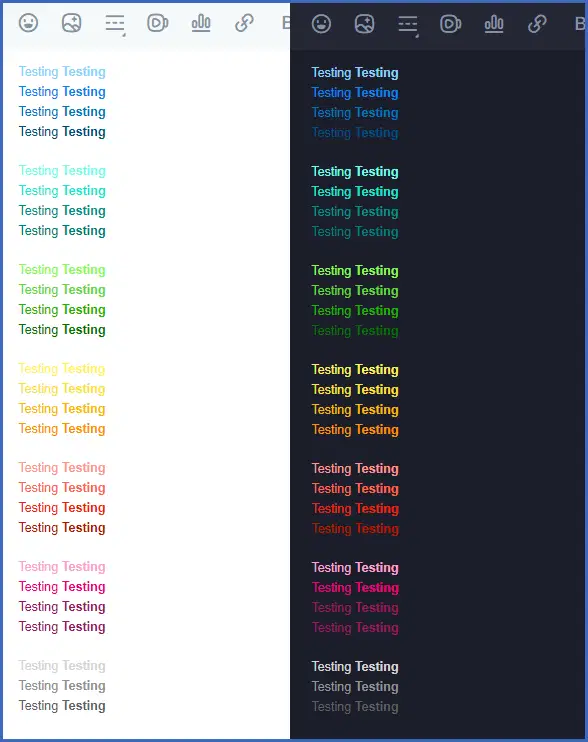
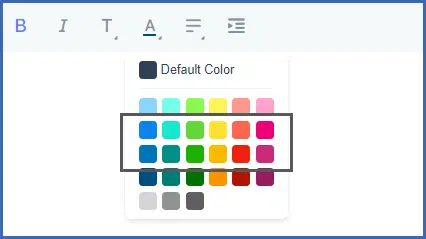
● As you can see, bright-colored texts can’t be clearly seen in the White Mode, while the dark-colored texts are too dark and probably ineligible in the Dark Mode. My suggestion is for you to use the two types of colors in the middle where it wasn’t too bright or too dark for both modes. Hopefully, HoYoLAB will add more color selections in the future.
That's all for today's issue of the Creators' Classroom!
We will bring you Guides Creation Basics (II) in our next installment! Stay tuned!
To learn more about your opinion for "Creator's Classroom", Creator's Assistant has prepared a questionnaire :>>>Link<<<
Your feedback is extremely important to Creator's Assistant. Make your voice heard!