Hey all, this is Creator's Assistant!
In the previous issue, we invited guide creator "SoraHoshina" to share with us recommendations on text layout when creating a guide.
Today, "SoraHoshina" will share with us some tips and tricks about image content and creation.
Lots of useful content here! Come on in and check it out!

4. Image
● Having no image at all in a guide is the biggest mistake for a creator. Images can keep Travelers’ attention while making it easier for them to follow the instructions of your guide. This also prevents readers from getting confused and could prevent incorrect steps.
● Currently, in HoYoLAB, creators can upload an image with a size of less than 20MB into the post, with a maximum of 100 images in a single post.
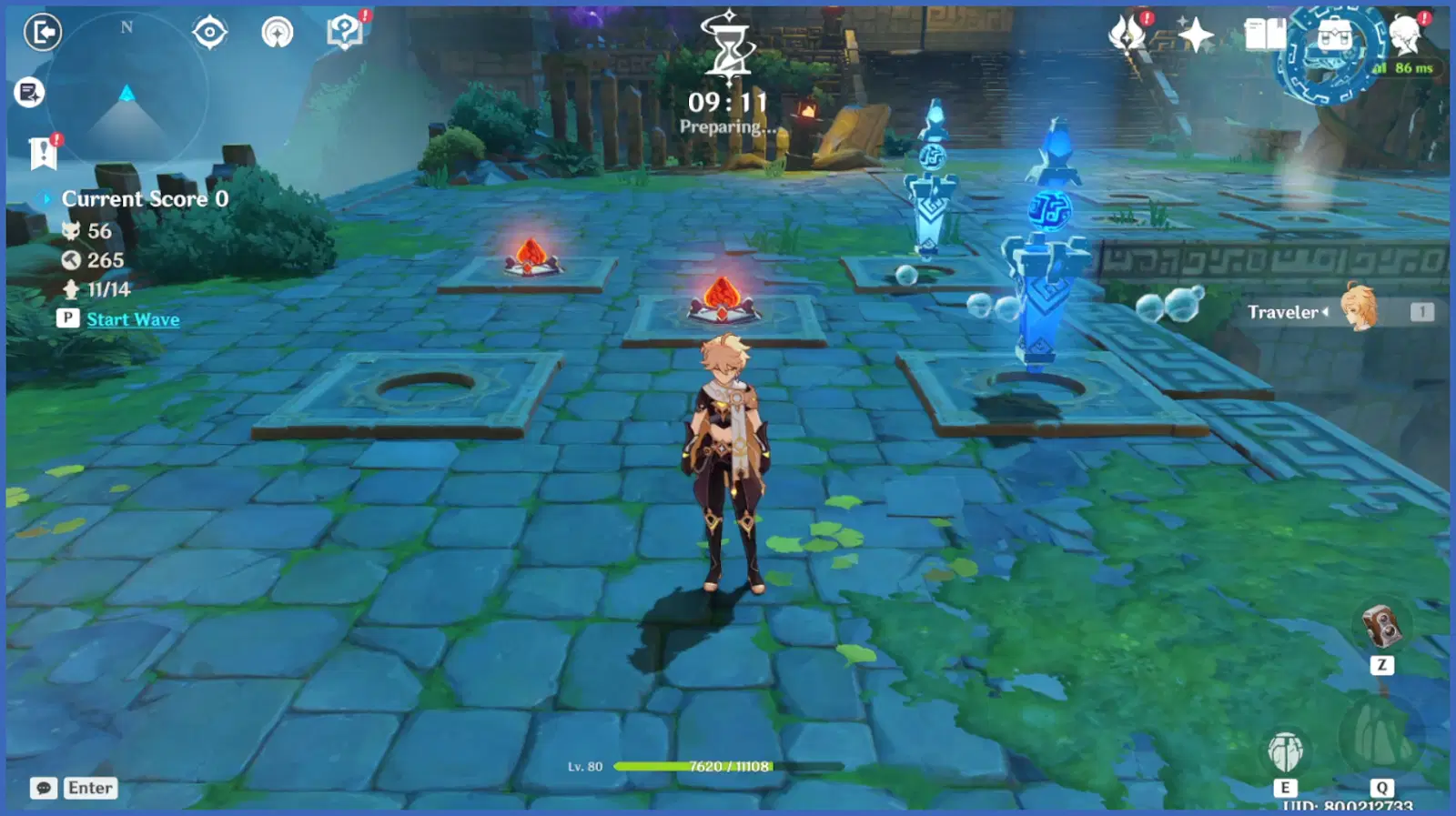
● Make sure your screenshots are clear, bright, and not blurry. The images you added must contribute to what your steps are. For example:
Dismantle 1 Pyro at the bottom left and add 1 Pyro at the top left. Then, add 1 Tandem Mine in the middle. The result will be similar to the image below.
● Add the images so readers know what you’re talking about. Don’t add unnecessary photos with the exception of header/subheaders.
● If you’re making a guide for a farming route, or quests where Travelers need to go to multiple locations, it’s better to add an overview map before going with the walkthrough. This will make it super easier for readers to follow your directions.

● What software do I use for photo editing? I only use Adobe Photoshop as I already learn the basics when I was in high school. There are tons of other software similar to Photoshop that you can use. One of the works I’d done using Photoshop:

● But if you prefer to use a website and not software, you can try using Canva. Although I use it for other purposes (not for making guides), it still works wonders if you want to crop a screenshot, add borders, texts, and so on. Even Microsoft Powerpoint will do, I’d know other Writer CCs who use Powerpoint for their infographic and that’s a dedication that I admire.
5. GIF
● Now, GIF is also an image file, similar to JPEG and PNG. Here’s the simpler term for each type:
○ GIF: Animated images that can moves
○ JPEG: Standard image format with white background
○ PNG: High-quality image format that supports transparency background
● So what about GIFs? Should it be added to a guide? In my opinion, there are pros and cons to using GIFs in guides.
Pro of using GIFs:
◇Convey steps better
Animated images can explain the walkthrough better than any images and texts can do.
◇Scaramouche-size file
One of the biggest advantages of using GIFs. This video-like image has a small size file.
Con of using GIFs:
◇ Can slow a page speed
If you use so many GIFs on a single post, the speed to that page will slow down. So, don’t use much in a single post.
◇ Internet connection matters
GIF file size is small, but in some instances when the internet speed slows down, the image will take time to load.
● How I add GIFs to my posts:
1) I always record every new quests/events gameplay using OBS Studio (It’s completely free).
2) Using Wondershare Filmora (You can use other video editing software), I’d use it to cut the videos into small sections and render all of them into MP4.
3) Lastly, I would convert all of them into GIFs using ezgif.com (A free website).
It would probably be faster if you use a video editing software that can directly save the split video into GIF, but Wondershare Filmora is kind of slow in converting it so I use the website where it is super fast.
6. Infographic
● An infographic is different than your usual guide. The name itself is self-explanatory, it is a graphic representation of information. For Genshin Impact, an infographic can be made for character builds, materials infographic, primogems calculation, event calendar, etc.
● Travelers who read infographics probably dislike long paragraphs (that’s why they look for infographics rather than a normal guide), so you should avoid too many texts in the images.
● Some of the examples for infographics:


That's all for today's Creator's Classroom!
If you have any thoughts on Creator's Classroom, you can leave your feedback here:
>>>Link<<<
You can also tell us what you want to see in the future Creator's Classroom in our questionnaire. Your thoughts matter!
*Please pay attention to the authenticity of information while visiting a third-party platform. HoYoLAB takes no responsibility and assumes no liability for any issues that might arise from such circumstances.