Hello, friends of HoYoLAB~
Web 2.0 Version is now available!
We have received plenty of helpful feedback from everyone. The following are some answers to common questions you guys had~

Interest Selection Menu
In the new version of HoYoLAB, the homepage is a collection of content from the old version's homepage, Tavern, and Hyperion.
Users can now customize the homepage to their liking and decide what content to display by selecting their interests.
If you need to make changes to the content of interest, you can do that via the browser.
After clearing the browser cache, re-select the tags you are interested in on the web version of HoYoLAB and log in (https://www.hoyolab.com/home).
Browser Settings > Clear Browsing Data > Visit HoYoLAB > Select Content of Interest > Log into Personal Account > Modify Interest and Save
We will try to optimize the reset preferences and content display algorithm of your content of interest as soon as possible.
Page Layout
We have noticed that many users have reported that the window displayed in the middle is too narrow and its contents are difficult to read.
In subsequent versions, the page design will continue to be optimized.
Community Level and Check-in
Regarding the user feedback that their community level has been reset, we have determined that this is a temporary issue during the user level system upgrade process.
Currently, the user level system has been updated, and the community level has been restored. Users can go to their Account Info to check.
In addition, the check-in portal has been moved to your Account Info page (see image below).

Night Mode Development in Progress
We will launch night mode as soon as possible to prevent users from being constantly exposed to bright light.
Game Check-in and Other Tools
You can click on the "Tools" option on the left to find the game-related tools "Check-in", "Map", and "Official Information".
View HoYoLAB ID
Personal information privacy upgrade!
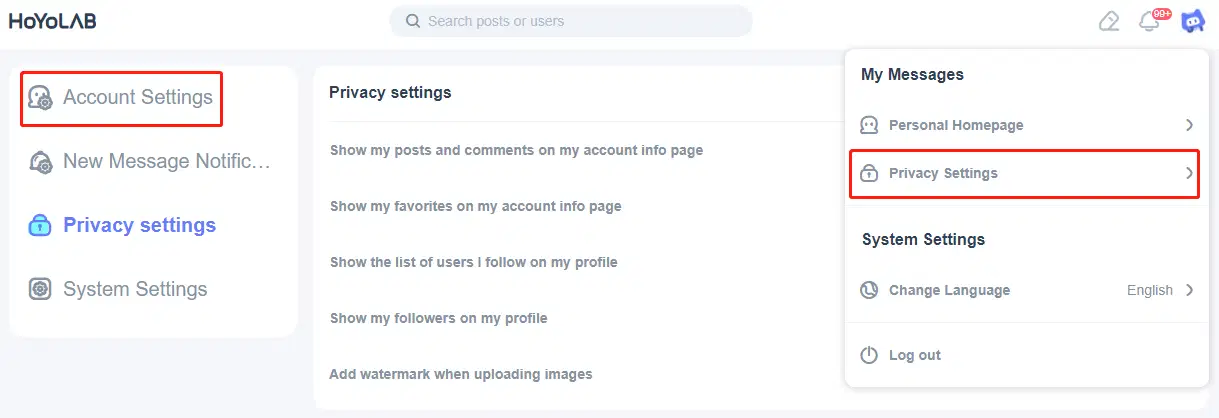
Now you can view your HoYoLAB ID by clicking your avatar in the top-right corner > "Privacy Settings" > "Account Settings" > "Log In" > "User ID".
Your ID will not be displayed to the public on your Account Info page.
Redemption Information
Current, HoYoLAB's Redemption Information page is temporarily under maintenance.
The application version of the Redemption Information page is expected to be added in the next version update.
The Web version of the Redemption Information page is expected to be available on September 23.
Please fill in your Redemption Information on the Web version after September 23~
Thank you for your feedback~
You can use the topic #OptimizationSuggestions to give us your feedback.
Let's all work together to improve HoYoLAB!