What is account recovery?
Basically, account recovery is a process designed to get you back into your account when you don't have enough information to reset your password. For security reasons, it might take several days or longer before you can use your account again.

First Page
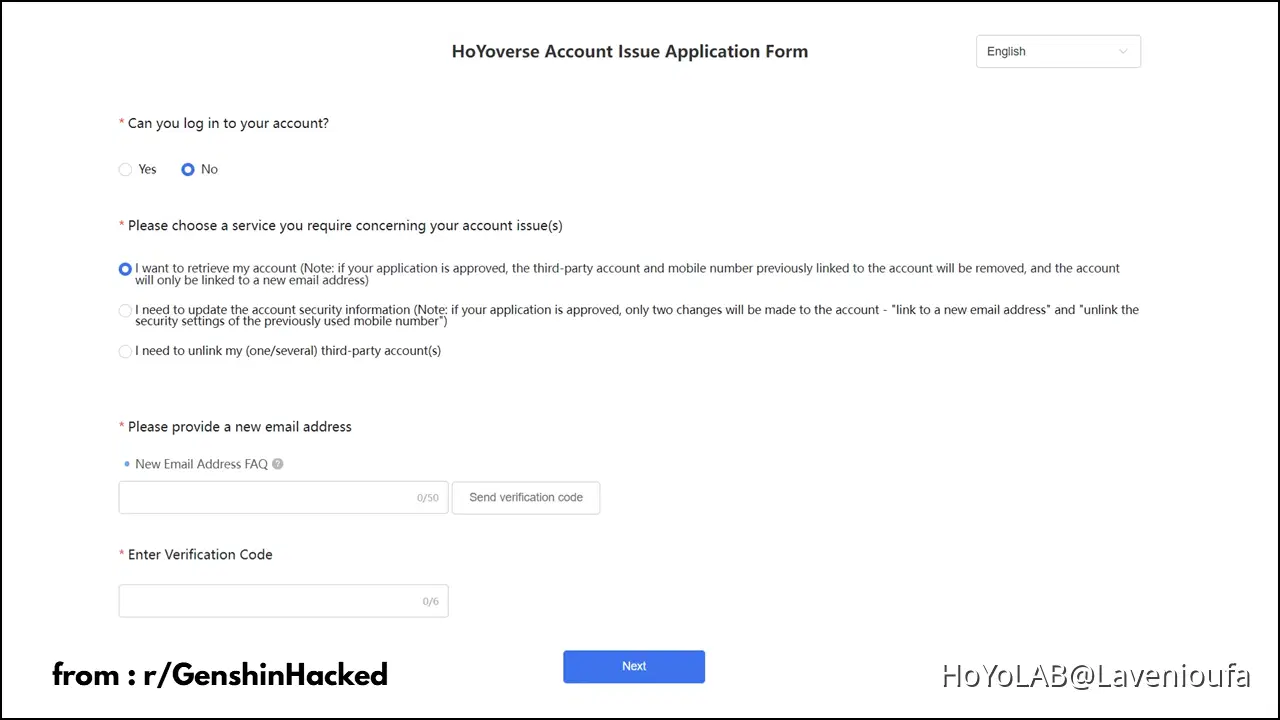
1) Can you log in to your account?
- Yes (If you are able to log in with a third party AND have logged in after getting hacked)
- No (If you completely can't log in to your account)
2) Account Issue
- First option - Account got hacked
- Second option - Add or change email
- Third option - Unlink phone number or third-party account
3) New Email Adress
This email address will be used to receive their reply and to bind to your account
Second Page
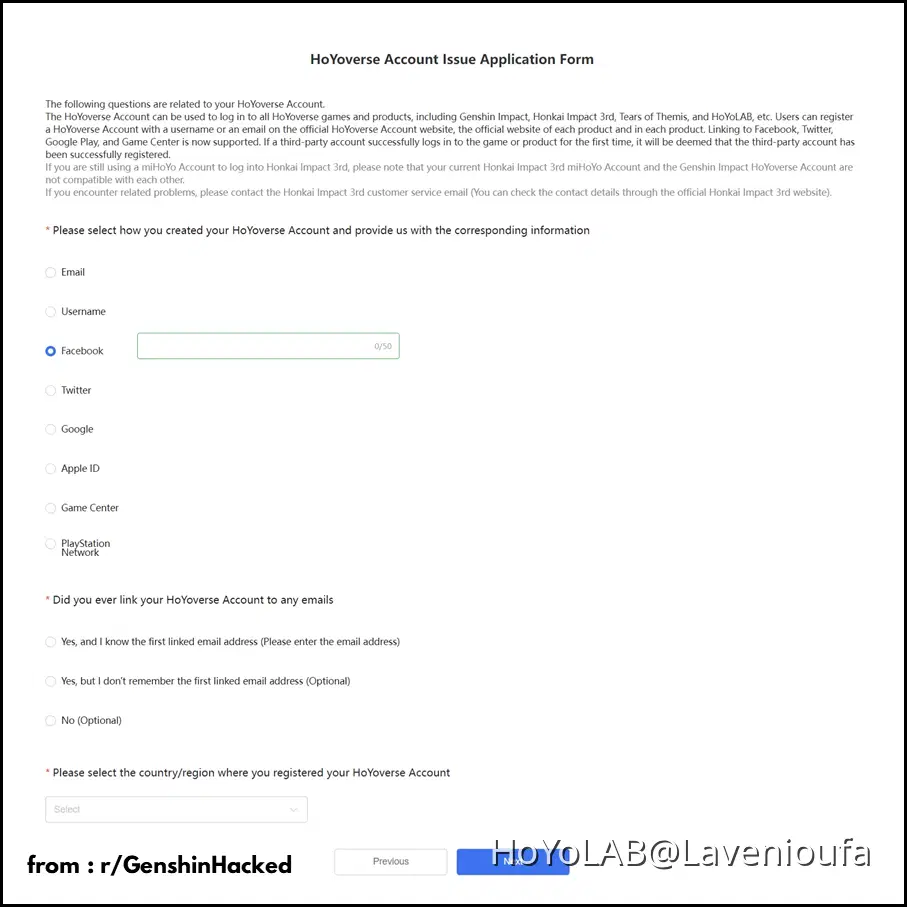
1) Please select how you created your HoYoverse Account and provide us with the corresponding information :
1. Email
- If you logged in your account using Email or created HoYoverse account using Email, check this option.
- If you have logged in using HoyoVerse Account and not a third party after 22 October 2020, Email is the only valid option.
2. Username
Remember, the last time it was possible to create an account with Username was 22 October 2020. Any account created after this day, can’t be created by Username and your login method CAN’T be username.
NOTE :
If you are coming from another HoYoverse game, this case is no longer true. It’s possible you logged into the game with Username.
Input Display Names of 3rd Parties (if used to create):
- Apple ID
- Game Center
- Google Play
- PSN (If you started playing the game on PlayStation, then this is your correct option)
2) Did you ever link your HoYoverse Accounts to any emails?
1. Yes, and I know the first linked email addresses
- Enter the first linked email address only.
2. Yes, but I don't remember the first linked email address (Optional)
- If you don't remember the first email but last or any other email address, provide it here.
- Leave blank, if you can't remember any.
3. No
- If you haven't connected any Email address to account, then only choose this option.
- If you have connected any email but don't remember, choose second option.
3) Please select the country/region where you registered your HoYoverse Account :
- Choose the correct country from the drop down menu when you started playing Genshin Impact.
- If you use a VPN, try to determine your country by fiddling with your VPN application.
Third Page
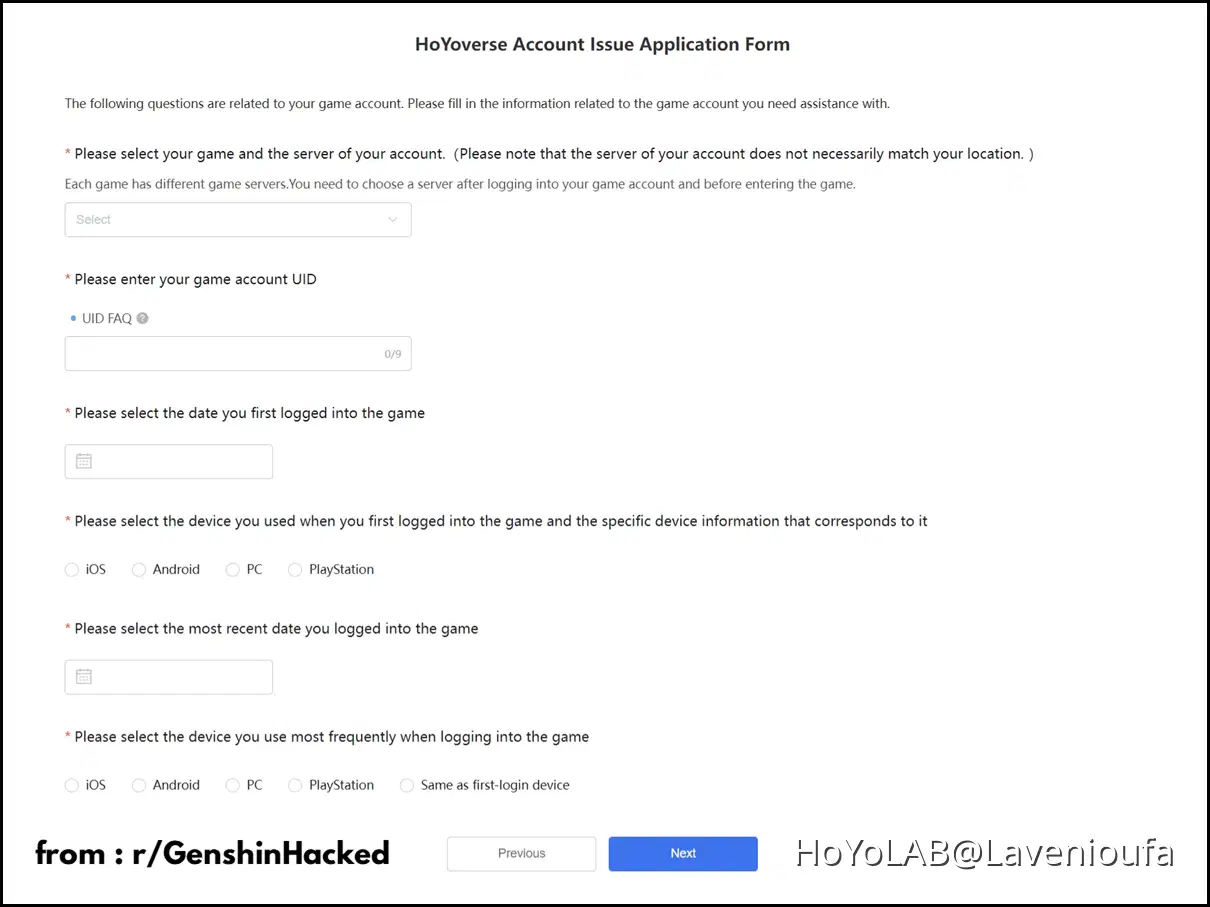
1) Please select your game and the server of your account :
You should only provide information regarding the game you are filling the form. For example, If you checked Genshin Impact, any information regarding Honkai Impact 3rd or/and Tears of Themis will be discarded.
Selected game server
- Select the game server you play most or are more certain with the Information.
- Account Recovery is only allowed for accounts with AR 5 or more.
2) Enter your game UID (NOTE : The process of finding model number can be different for different Devices)
You can find UID in following ways:
- UID is mentioned in the bottom right corner of the game/screenshots.
- You can ask your friends to note your UID from the Friend list.
3) Please select the date you first logged into the game
- The date when you first logged into the game for the first time.
- Game account registration date is NOT HoyoVerse account registration date.
- Via Anniversary Web Theater 2021 (Link to the Web Event)
4) Please select the device you used when you first logged into the game and the specific device information that corresponds to it : (NOTE : The process of finding model number can be different for different Devices)
- iOS (Open Setting Apps, Select General, Tap About, Write down Model Name)
- Android (Open Settings, Select About, Write down Model Number)
- PC (You need to put specification of your PC/Laptop, such as CPU, GPU, Grapichs Card, RAM, etc. (Remember to put it in GB and not MB)
- PlayStation (Select your PlayStation device on the form)
5) Please select the most recent date you logged into the game :
- Enter the date you were able to login into the game last time before getting Hacked.
- Once you submit the form, restrain yourself from logging into the game as further logging in can invalidate this question in form. If by any chance you did, send an additional Info to update the last login date on the form.
6) Please select the device you use most frequently when logging into the game :
- It is the device you played Genshin Impact mostly on.
- If you play on multiple devices but is unsure of which device had the most hours on, you may select one of the devices then mention them both on the Additional Information.
- If you play on multiple devices, you can mention all of them in respective blocks.
- Only mention one device in one block. If you use two android devices, mention the android device you play on most based on hours.
Fourth Page
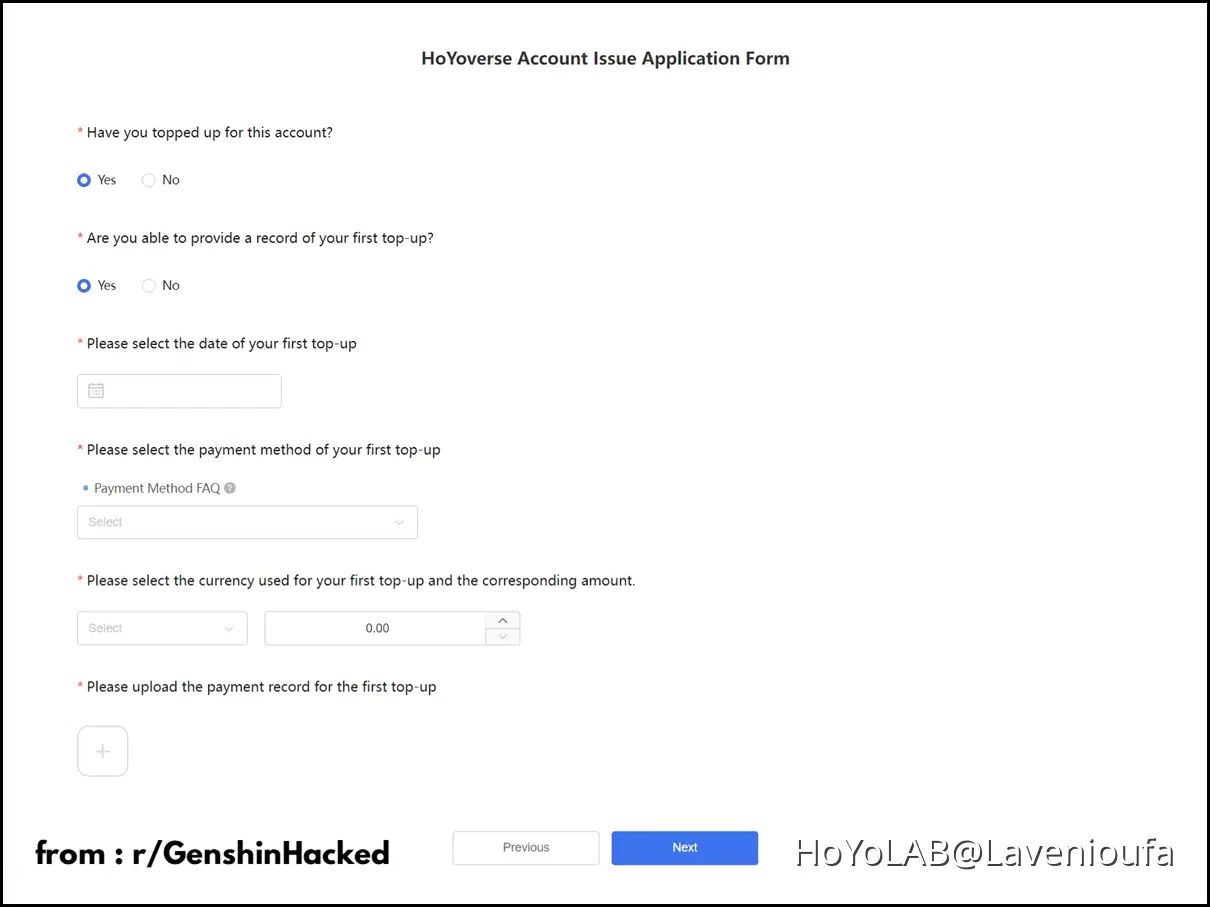
1) Have you topped up for this account (Were any purchases made on this account)?
Yes (If you or your friend have made a purchase on your account, or if you have won a giveaway)
No (If you are F2P)
2) If your account has been topped up before; Are you able to provide a record of your first top-up?
1. Yes (Will be led to question : "Provide the following if you’re able to provide first top-up receipt")
Provide the following if you’re able to provide first top-up receipt :
- Date of your first top-up
- CANNOT be a day or even a few days off
- The payment method of your first top-up
- The currency and the amount spent
- Upload an image of your first top-up receipt.
- Please only give the first top-up receipt
2. No (Will be led to question: "If you’re unable to provide first top-up receipt, please give the following")
If you’re unable to provide first top-up receipt, please give the following :
- Select the month you made topped-up
- Not the first top-up month
- The main payment method used during that month
- The currency and the amount spent during that month
- Upload an image of your receipts
- No more than 10 receipts
3) Upload the Payment Record
You can include the screenshots of your top-up receipt from Google Play, Coda Shop, or other payments.
Fifth and Sixth Page
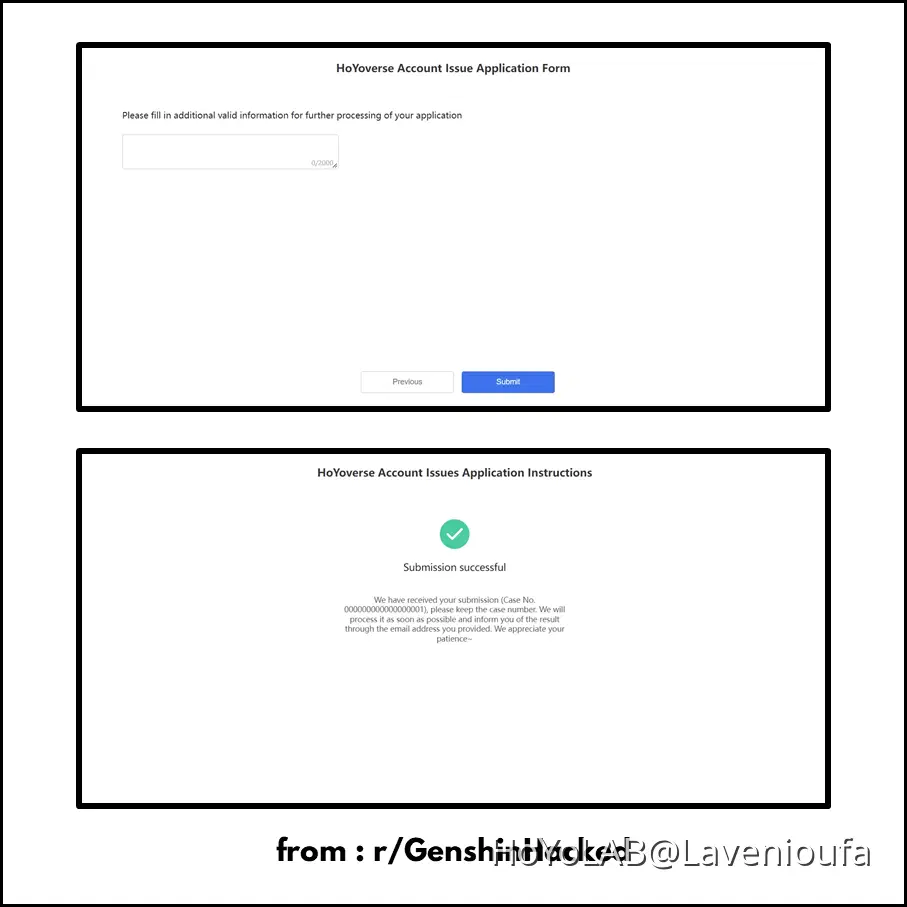
Additional Information
I'll share on separate post about this. Make sure to click link down below :
I hope the information I provide is useful. Not only to the player whose account is hacked, but to other players out there facing similar situations.
Another Related Content :
Make sure to go to r/GenshinHacked if you want further and more detailed information.
References :