


At least I think we’re on 1.4, they stopped giving us patch numbers but that’s the last thing I saw for the app so since we basically are the app now might as well use that.
Section Reorganization
Before, there were 4 tabs at the top: Home, Tavern, Official, and Billboards, with a search bar, rotating post banner, following next to account picture and 3 buttons on the right side of the screen. Now they made some changes to home.
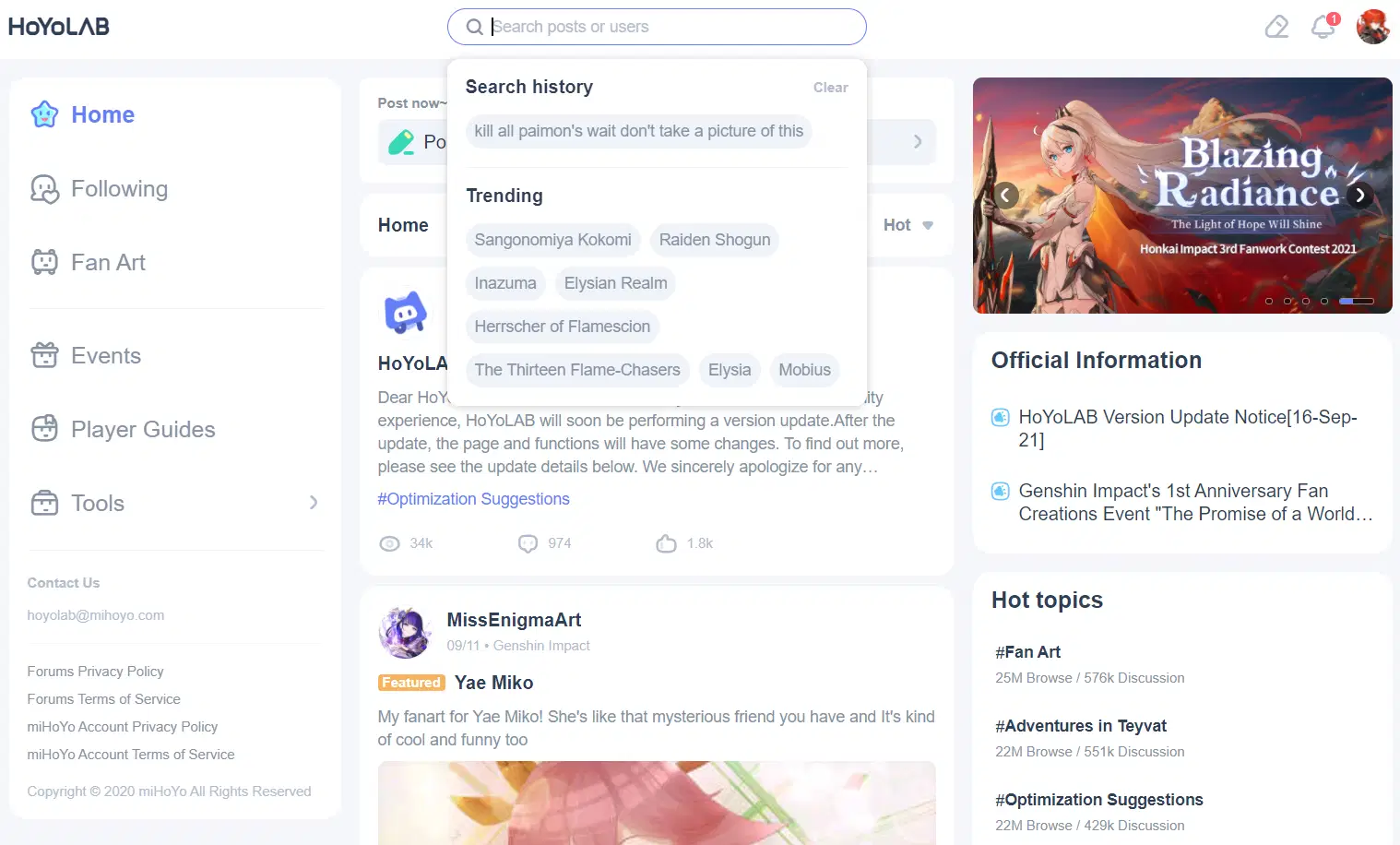
The corresponding sections from old to new are:
Home -> Home
Billboards -> Fan Art
Official -> Half to events and Half to tools
Tavern -> Deleted (chotto matte nani kinda weird that they deleted tavern not sure what the easy way to discuss is now)
Checkin/Battle Chronicle/Map -> Tools
New Section: Player Guides
Kinda new section but not really they just cordoned some stuff off: Events
In addition, Genshin and Honkai got combined but are still separated kinda but are also kind of combined too, and Tears of Themis does have an official account that you can find and see all their posts but there isn’t a way to post to a Tears of Themis topic which is akind driew guess you all are going to have to wait before you can meet my harem ahem I mean our lovely Tears of Themis mods.
Edit: ToT does exist now so SoonTM
Home
Aside from the layout moving half of the top bar stuff to the left side of the screen, everything that was there before is still there and they added some stuff. Not sure why there’s a post section on home with a separate post button the top right seems kinda weird and redundant but I guess if you’re ever lost on how to post?
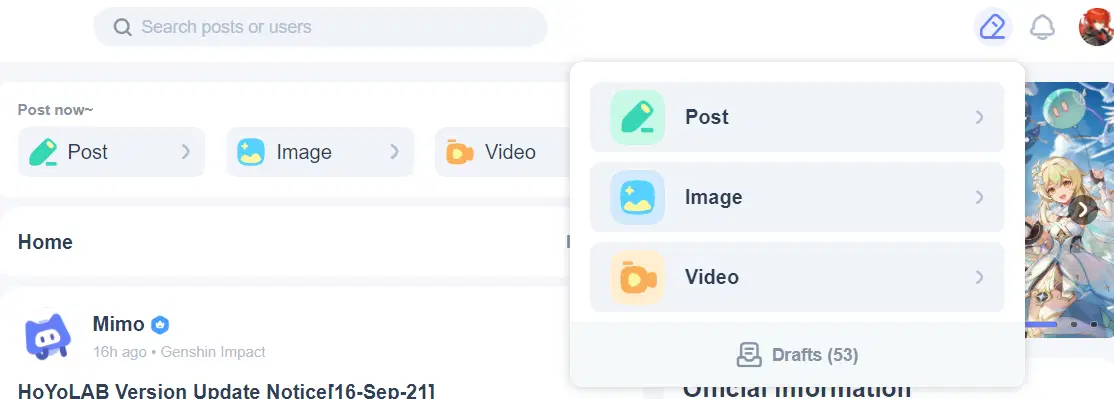
Also, while you can still choose between Hot/Featured/New posts/New replies on Home for sorting, for some reason this section doesn’t let you choose between Honkai and Genshin. Not sure if that’s intended but feels weird kinda if it is.
Important Changes:
-Search will also provide “trending” aside from your history. I have no idea how they determine what’s trending but I guess we’re twitter now.
-Hot Topics are literally just the old topics that were on the sidebar but they now show Browse/Discussion numbers which I’m 90% sure is just total views/comments of all posts tagged with those. Also you can only view those by new since there’s no way to change the sorting so yeah feels kind of weird.
-If you scroll down far enough on the right side of the page there are things to let you download the mobile app, which you probably actually need since some things are missing on both seems just a tad little bit of kinda weird.
-There’s an actual contact email for the forums (which I’m assuming is to report stuff like plagiarism and contest violations since literally there was no actual way to do that before except literally comment on the offending post/event results post and hope someone notices) and a full set of rules, so no complaints that you weren’t aware of the rules when the hammer comes down.
Following
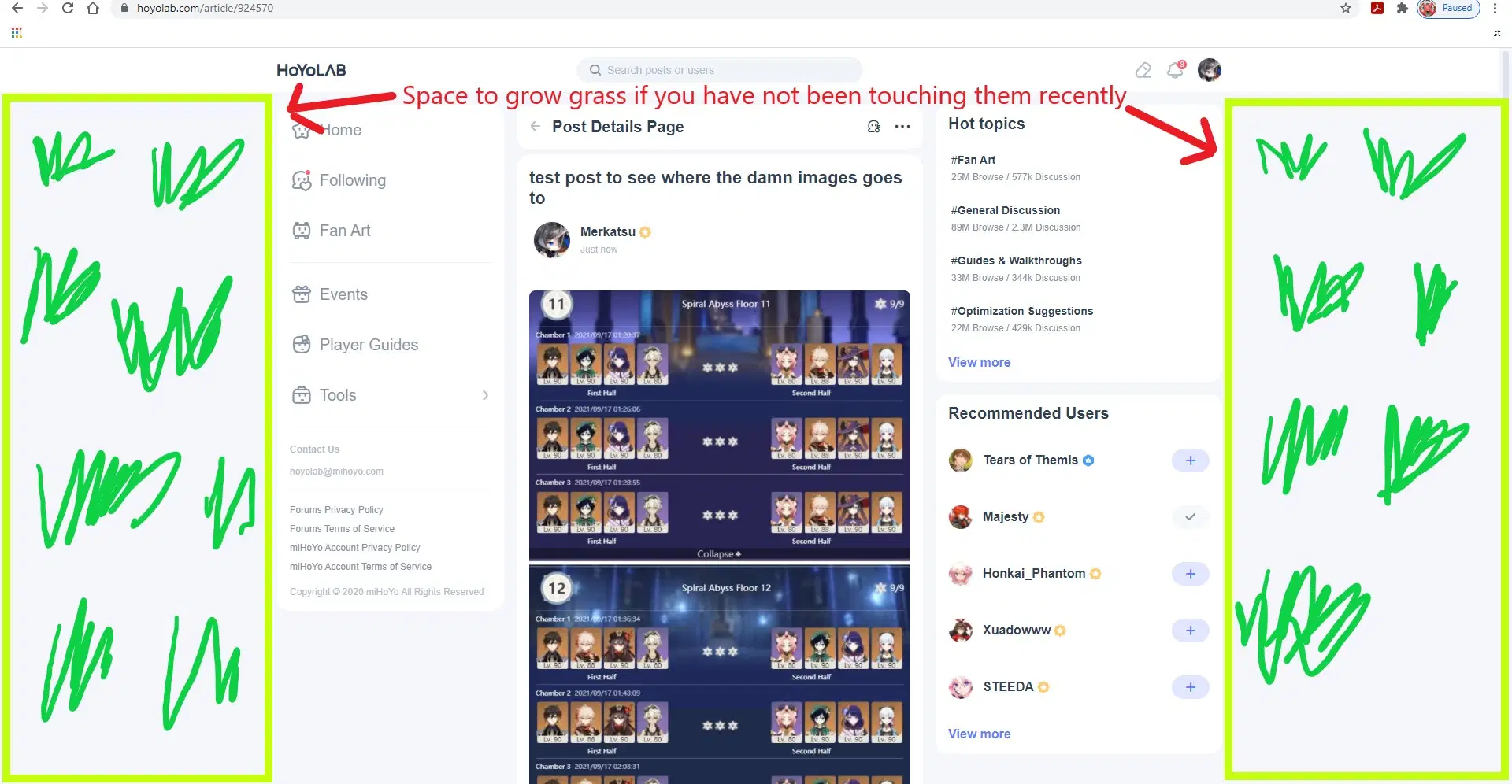
Yeah nothing really changed here except if you follow people who posted for different games or the official account of different games, that will all show up here now so you actually won’t be able to tell which notification is coming from what game when it shows up. Also the topics and recommended users sidebar doesn’t disappear like before and also stays on every post you view which leaves only a third of screen which I daresay is kinda weird.
Also it doesn’t even take up your full screen (credit to Merkatsu for this) so yeah.
Fan Art
Seeing as how this section is literally called “Fan Art” instead of “Billboards” now, for the love of god stop posting in-game screenshots here if it isn't for the required events. Also you can filter if you want to see Genshin or Honkai by changing the filter next to the sorting method at the top.

Events
By events, miHoYo actually means HoYoLAB events which some of them are submission events but not all of them and there’s no tab that has them separate like on the mobile app which you can check while posting and also there’s a section under Official Notifications for events that contains the exact same content so kinda weird. The colors and words at the bottom of each event tell you their state: green for you can still participate, red for participation closed but winners not announced, and grey for everything related to that event finished.
Player Guides
There’s now a guide section (which we apparently sacrificed Tavern for I guess). It contains a Guide Collection section at the top, which doesn’t actually contain guide collections but instead randomly chosen master posts of individual user’s guides with the word Guide Collection in the title but not all of them, and a Featured Guides section beneath that, which doesn’t actually contain guides that are “featured” by the system but instead a random collection of guides that have [Version 2.1] in their name. Seems kinda weird and probably not how it's intended but given the amount of reported bugs I’m totally not surprised. Below those two you have the rest of the guide posts with the standard sort methods and also whether you want Genshin or Honkai as a filter at the top.
Tools
This is where the Battle Chronicle, Interactive map, and what most of you probably care about, Check-in got moved to from the right side of the screen. Official announcements also got moved here for both Honkai and Genshin; you can find them under each game’s section as Official Notifications.
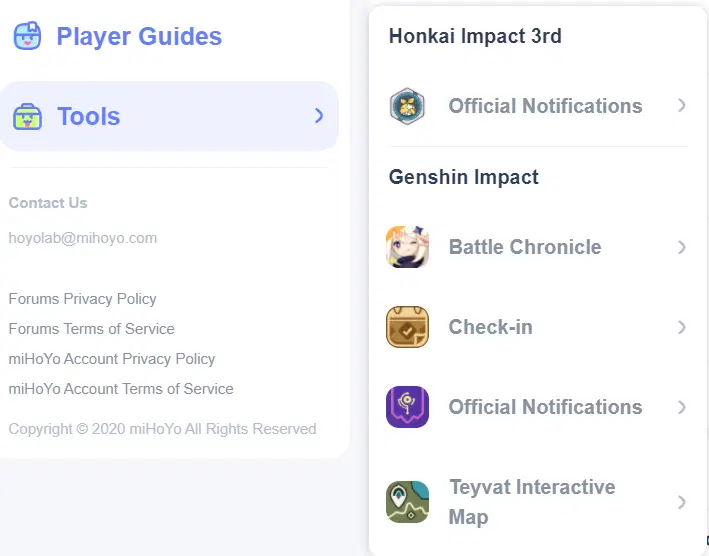
Under official notifications, you have Events, Notices, and Info. Events is literally the exact same thing as the Events section, which seems redundant and kinda weird. Notices are pretty much the exact same as before where version and update details go there. Info is where everything else is posted and pretty much a merger of old info and in-game events that used to be under events.
Tavern
Oh yeah this got deleted moving on.
Posting
How you actually put something onto HoYoLAB, which is now conveniently available at the top right of your screen regardless of section and very clearly tells you that you can write and save drafts for things which was available but a lot of people didn’t know about. Anyways, standard text editing tools from before still exist, but now you have to choose a category. This is not the same thing as topic, which shows up after you choose a category, but instead where your post will end up and for which game.

As for what board things end up for each category:
-Fan Art: Fan Art, Cosplay(?), Fan Fiction(?), Video Editing(?), Animation(?)
-Guides: Guides
-Lost and Floating around in the Sea of Quanta b/c Tavern Boom: Everything else
Post is for things that are primarily text, Image for things where the focus is on the attached images, and Video where the focus is on the attached video. For Image, you are required to designate whether it is your original work. If it isn’t, you leave the bar unselected and you must have obtained permission from the artist to repost it whether in some blanket authorization by them or from asking them directly. If it is your original work, you then designate whether you allow or prohibit reposting (and the description in view more details is backwards I know).
User Info
You can get to all this by clicking on the profile icon in the top right.
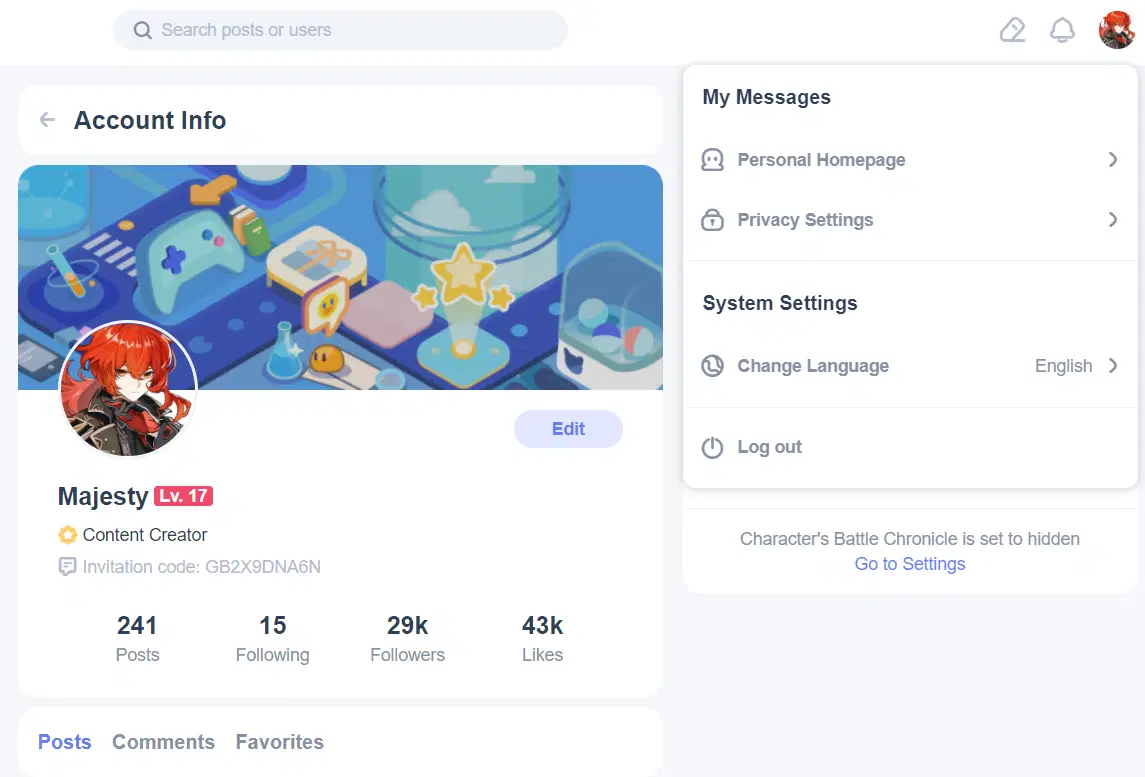
Personal Homepage
Here you can see your information. Clicking on likes will tell you your total likes, but clicking on any of the other three will just take you to a list so yeah I don’t actually know how to see exact values for any of the first three past 1000. The mobile app will at least have the courtesy to give followers and likes to one decimal place, but it doesn’t have Level. The mobile web version is just missing the k on the numbers so it’s the worst of both worlds.
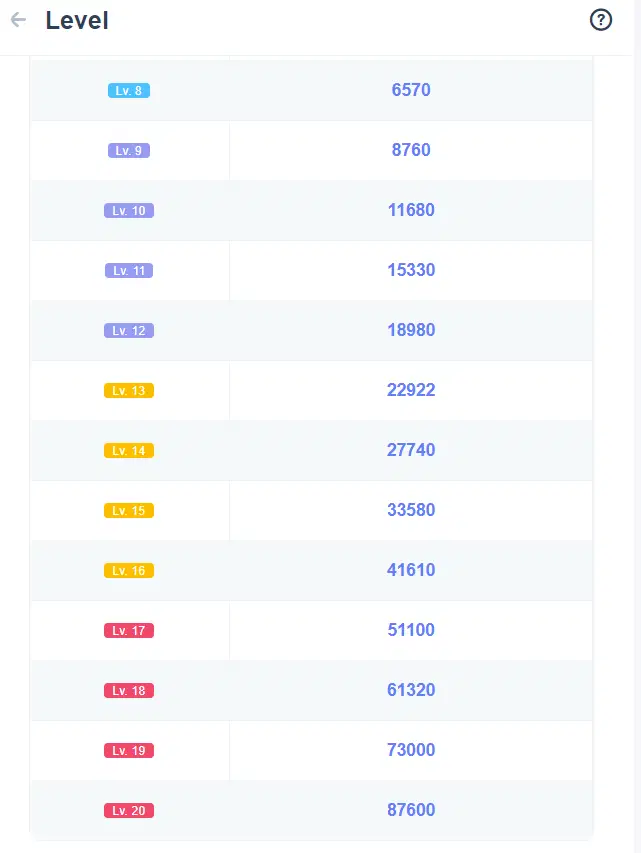
Speaking of Level, that doesn’t actually show up anywhere except your profile now and in order to actually see how much exp you need and your daily tasks you actually have to click on your Lv. (this is literally also where you check in for that exp). Between the fact that it pretty much doesn’t show up anywhere and the mobile app literally doesn’t have it, it’s KINDA WEIRD that they added 4 levels, especially since prior to this update there were literally only 2 Lv. 16’s on HoYoLAB (me and the emergency food; I’m 17 now tho due to my Honkai exp apparently). Also for some reason the exp for 16 -> 20 is more than the exp from 1 -> 16 miHoYo do you really expect people to spend over 2 years getting max exp every day. (Also why did you remove the sidebar with like/favorite/comment at the left of every post how am I supposed to quickly get my daily exp for that now smh).
Settings
Accessed by either hitting privacy settings or the go to settings link on Battle Chronicle in your profile.
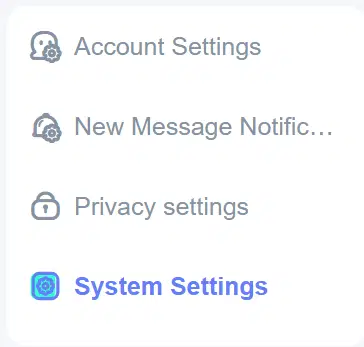
Account settings takes you to a different webpage that has all your account information. It’s also the only place you can get your HoYoLAB Id now since they removed that outside of your profile url. New message notifications determine whether or not you’re notified about new system messages, comments, likes, or follows. If you suppress any of them, not only will they not trigger the bell (or the phone pop-up in the app), they literally won’t show up at all anywhere. I turned off like notifications because I was tired of seeing 99+ every single day on my notifications, and as a result I legit have no idea who’s liked my stuff for the past 2 months. Also these settings are synced with your mobile app. Privacy settings are the same as before, while System Settings is literally just which language on HoYoLAB you want to see.
Which is fine and dandy and all, except some of the stuff we used to have is now missing in settings and only available on the mobile app, including stuff that was originally also available on the mobile app. For any prize redemption information, you can only do that in the mobile app, except it also only lets you do it for Genshin now so I guess if you win a prize for Honkai you’re screwed atm. Also, if you want to block users or manage blocked users, you can still only do that through the mobile app. Also, if you want to submit feedback or contact cs, you can again still only do that through the mobile app. I feel like some of that stuff is just a tiny tad bit important, so it’s KINDA WEIRD the only place you can do it is in the app.
Conclusion
I’m guessing we’re twitter now instead of a game forum, except we have a 20,000 character limit that I still manage to hit pretty much all the time instead of what a 250 one sorry I don’t use that platform aside from entering contests. Anyways, in order to get the full HoYoLAB user experience, you’re going to need to use both the website and the mobile app at the same time which needless to say is DIANK EDRIW. Now then, let’s all pray for bug fixes and more optimization and dark mode in patch 1.5 (or whatever patch we’re actually on).




